
Stay steady on your GLP-1 journey.
Anchor-1 keeps your doses, meals, water, workouts and supplements in one calm place. It works with semaglutide, tirzepatide and every other GLP-1 — and everything you log stays on your phone.
Stays on your phone
No account and no cloud. What you log is stored on your device and nowhere else.
Free and ad-free
No purchases, no subscription, no ads — nothing to unlock and nothing competing for your attention.
Works offline
Log a dose, a meal or a workout with no signal at all. Anchor-1 doesn't need a connection.
Every GLP-1
Injections, pills, compounded vials, twice-a-day and weekly — one plan for each medication you take.
Any schedule
Daily, twice a day, weekly, every two weeks, monthly, or every set number of days.
Gentle reminders
Doses, supplements and a daily nudge, delivered by your phone — and quiet once you've logged.
Everything a GLP-1 day asks of you
Organized the way you'll use it — by what you're doing, not by a menu of settings.
Doses & medications
Whatever you take, on whatever schedule you take it.
Every GLP-1, every schedule
Semaglutide, tirzepatide, dulaglutide, liraglutide, exenatide, compounded and oral versions — or a custom name. Daily, twice a day, weekly, every two weeks, monthly, or every set number of days, for each medication.
A next-dose countdown for each one
Counted from your last logged dose and that medication's own schedule. A twice-a-day medication reads “1 of 2 doses today” and shows when the next one is.
Injection-site rotation
Each dose starts on the site you've used least recently. Pills skip the site entirely.
Reminders that stop when you've logged
A reminder for each dose, and up to three follow-ups if one is still due. Logging the dose cancels them. Delivered by your phone — nothing to sign in to.
Vials & dose calculator
For compounded medication, where the label is what you have to go on.
mg, mL and syringe units, side by side
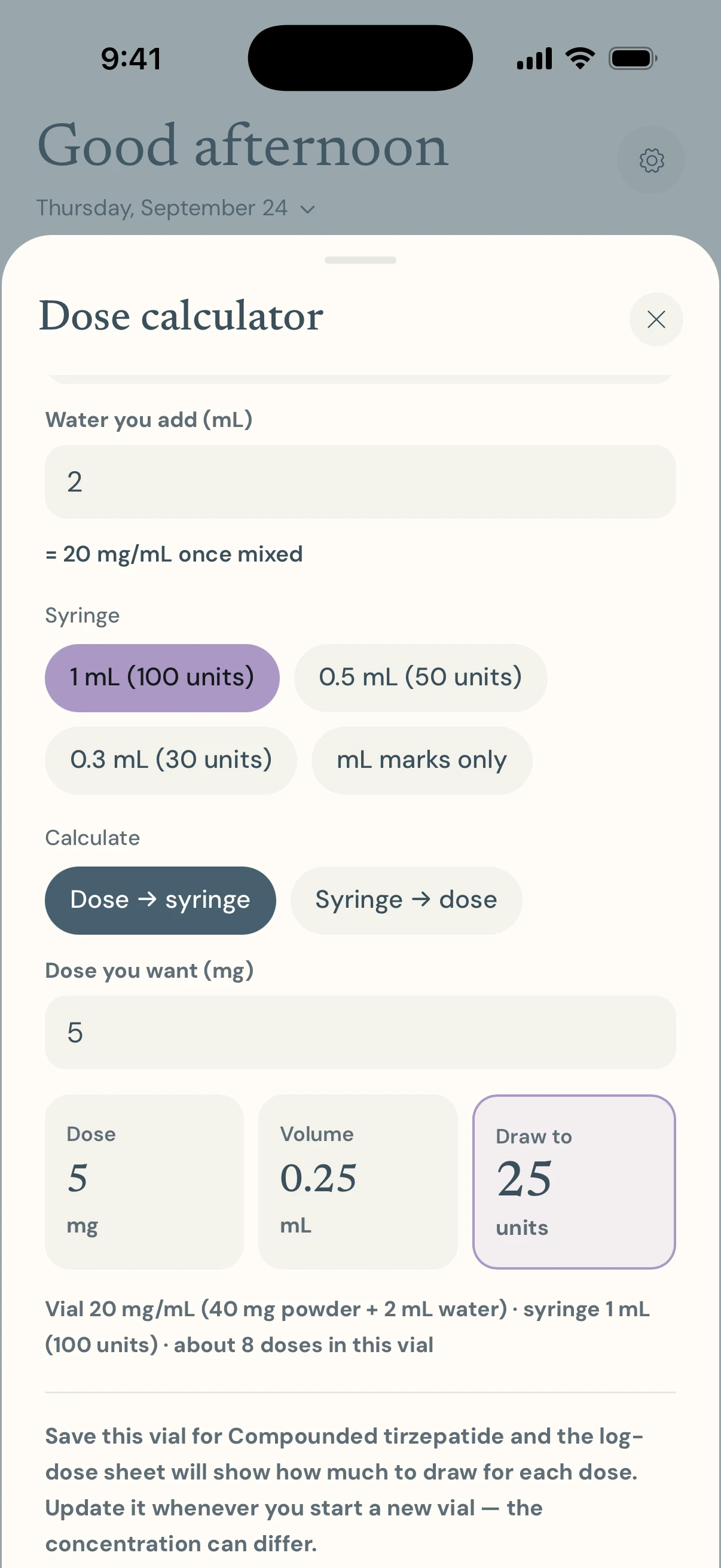
Enter what your vial label says — a strength, or total mg and mL — and pick your syringe. Anchor-1 shows the dose, the volume and the mark to draw to together, so a mix-up between them is easy to spot.
Warnings, not just answers
If a draw wouldn't fit the syringe or the vial, no number is shown. Above the highest labeled dose, or a very small draw, you get a warning beside it. It never says how much water to add — that's for your pharmacy or prescriber.
Food, water & nutrition
Targets that fit on a GLP-1, and a log that takes a tap or two.
Protein and fiber targets
Protein is set from your weight and fiber from a 30 g target. One ring shows how close today is to protein, fiber and water together.
Hydration
A daily water goal in ounces or millilitres, filled by the drinks you log. Sugar and carbs in a drink count toward your limits too.
Sugar and carb limits
Limits, not goals: each bar fills toward your limit and changes color as you near it and when you pass it. You choose the numbers.
Quick add and favorites
Common foods and drinks are ready to tap, with your recent items and starred favorites first. Fix a time or delete an entry after a confirmation.
How you feel
The side effects and good days that a scale never shows.
Side-effect log
Tap a symptom once for mild, twice for moderate, three times for severe. Nausea, vomiting, diarrhea, constipation, fatigue, reflux and more.
Mood check-ins
Low, okay, good or great — as often as you like, each with a time. Two or more draw a small chart of your day.
Blood sugar, if you track it
Optional and off until you turn it on: readings by context (fasting, before or after a meal, bedtime), an average against the common 70–180 mg/dL range, and your A1C results.
Movement
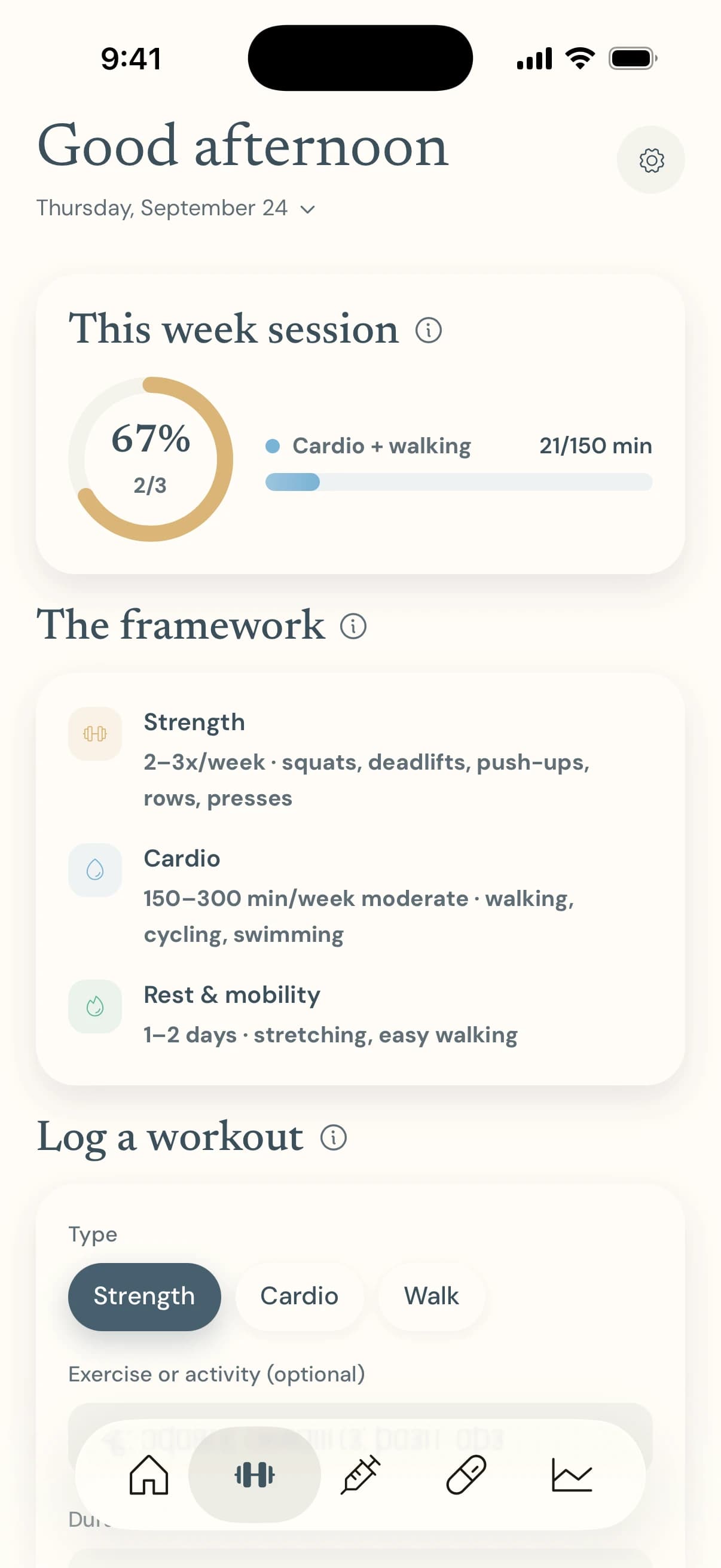
A weekly rhythm rather than a daily score.
Strength, cardio and walks
Log the type, how long and how hard it felt, with an optional note. Fix the time or delete it later.
A rolling week
A ring counts strength sessions toward three, and a bar adds up cardio and walking minutes toward 150 — over the last seven days, so it moves forward every day.
Supplements
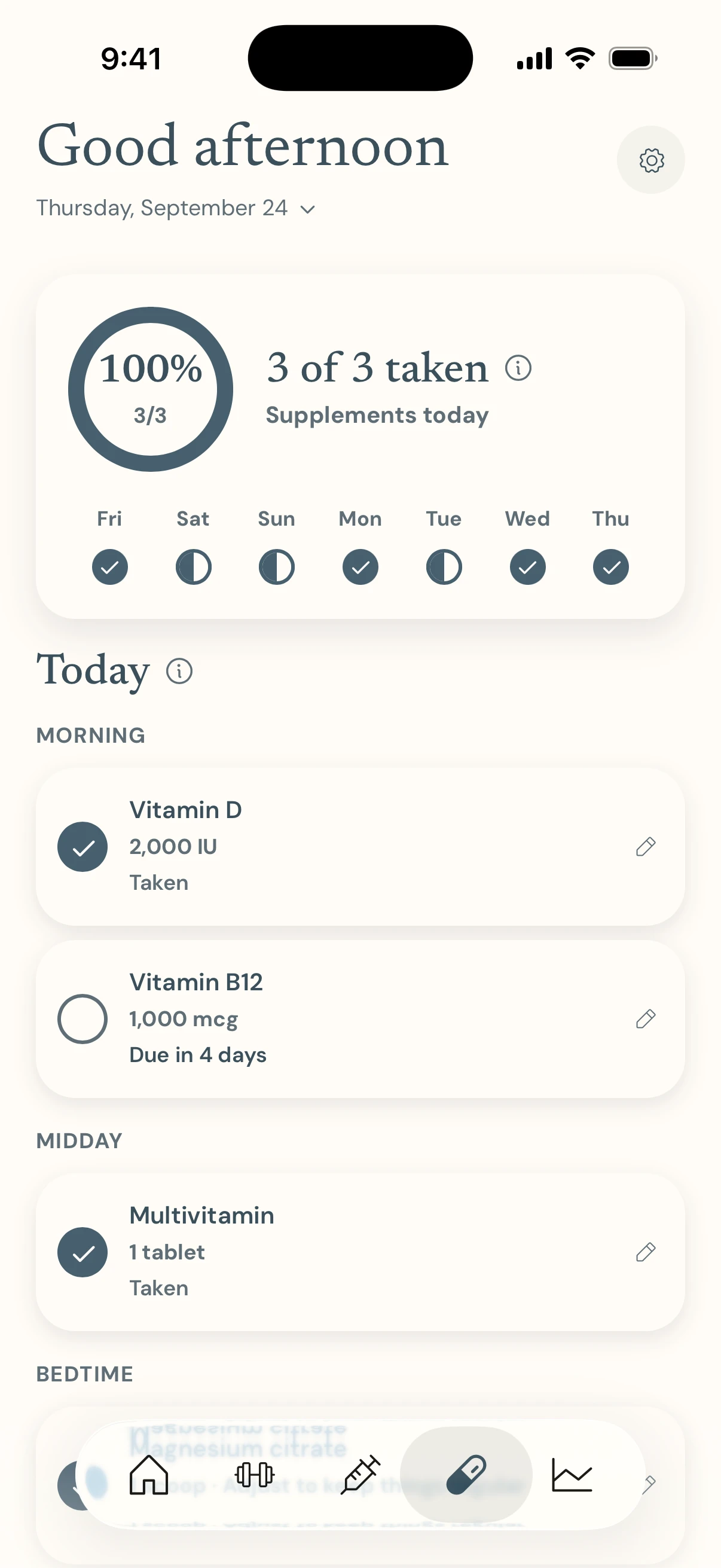
A plain checklist. Anchor-1 tracks what you take; it never suggests what to take.
A checklist by time of day
Add each supplement once, with how often and when. It appears under Morning, Midday, Evening or Bedtime to tick off, with your last seven days as a strip above.
Reminders for what's left
One reminder per time of day, listing only what you haven't ticked yet. Tick everything and that day's reminder is cancelled.
Trends & insights
Your own numbers, put next to each other.
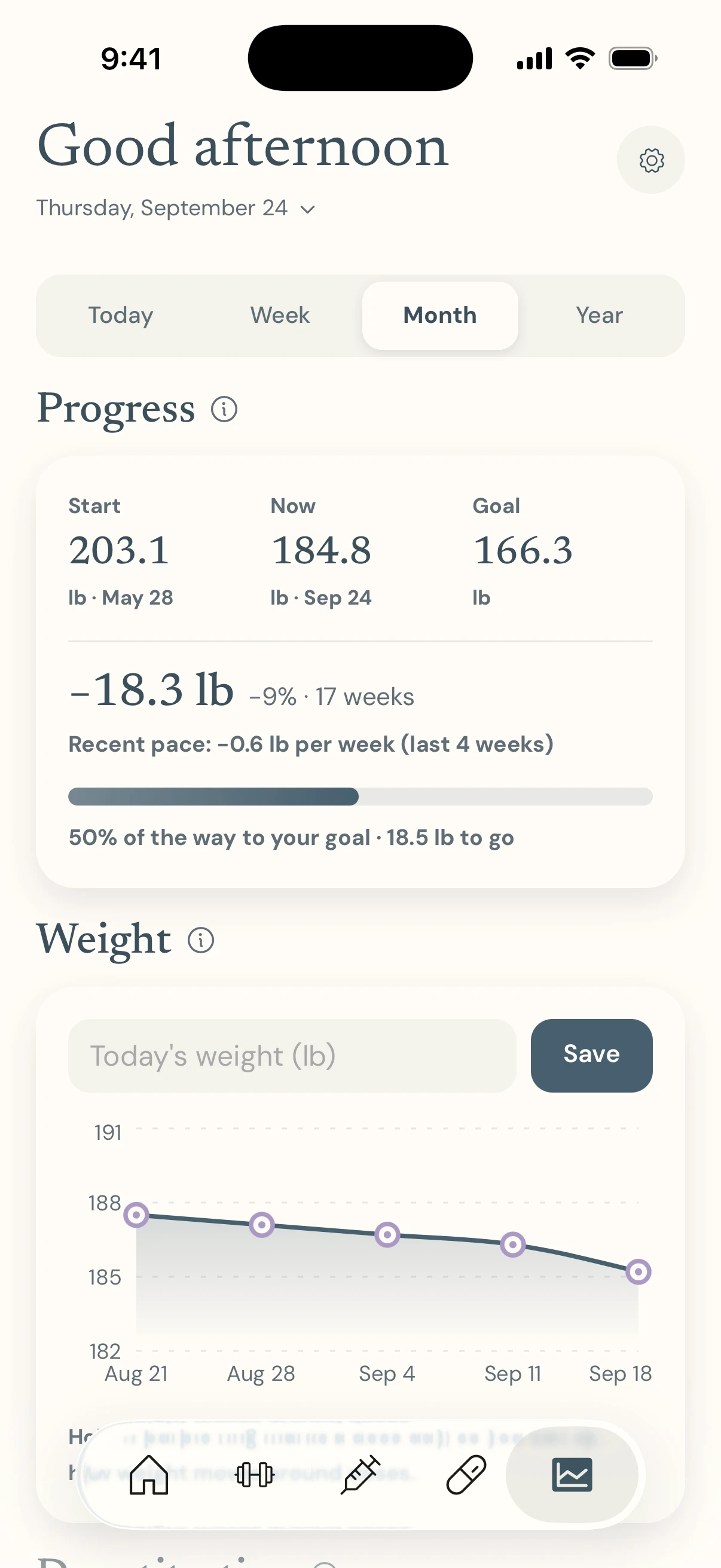
Progress to your goal
Start, now and goal weight, the change so far, your pace over the last four weeks, and how far along you are. Weight charts mark the days you took a dose.
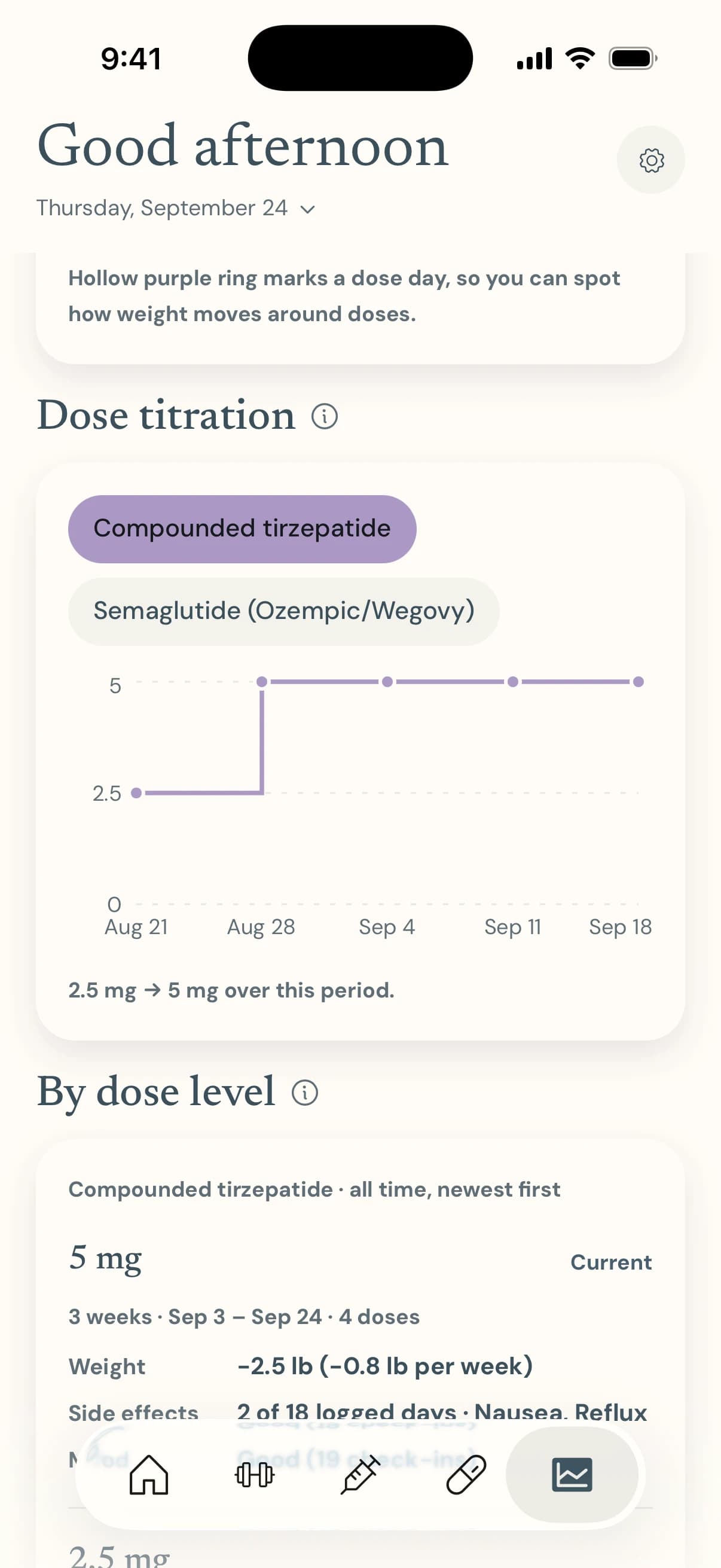
Dose titration
Every step up or down in the doses you've logged, charted for each medication you take.
By dose level, and after each dose
Weight change, side effects and mood for each dose you've stayed on — and which days after a dose side effects tend to show up. A pattern in your own data, not proof of a cause.
Estimated level
A rough, relative picture of a weekly medication between doses, from its typical half-life. It isn't a blood test and is never shown in mg. Semaglutide, tirzepatide and dulaglutide only.
Yours to keep
It's your data. These are the ways to move it, show it or remove it.
A summary for your care team
A plain-text summary of your medications, recent doses, weigh-ins, side effects, check-ins and intake. Copy it into a message or portal — nothing is sent until you paste it.
Backup and restore
Export one file with everything, to Files, iCloud Drive, AirDrop or Mail, and import it on a new phone. Restoring shows what would be replaced first, and can be undone straight away.
Your units, your look
Pounds or kilograms, ounces or millilitres, mg/dL or mmol/L. Light, dark, or follow your phone.
Erase it all, any time
Settings → Reset all data removes everything Anchor-1 has saved, after a confirmation. There's no account to close.
One calm view of your day
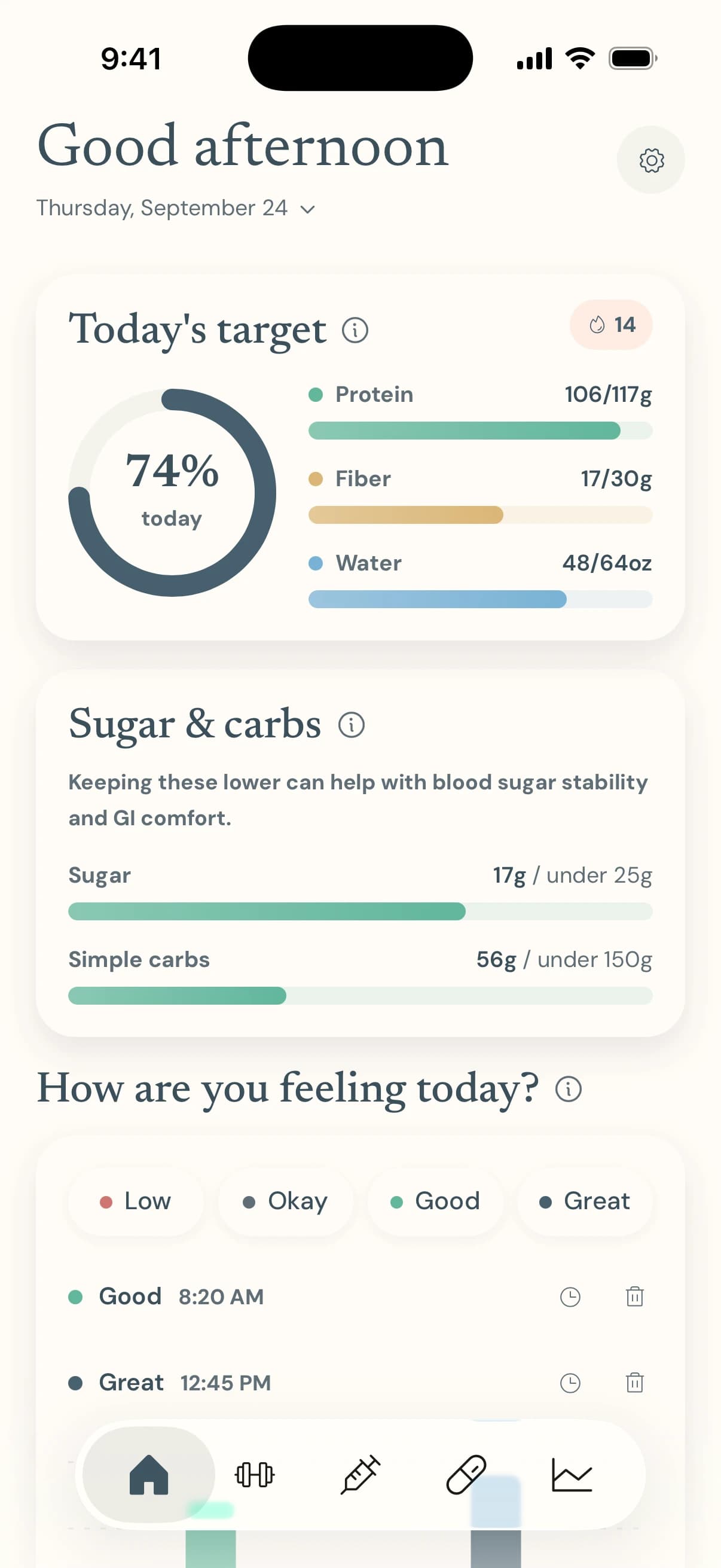
Protein, fiber and water fill a single ring. Sugar and carbs are limits, with bars that shift color as you near them. Add a meal or a glass of water with a tap or two, and note how you're feeling as the day goes.
Protein is set from your weight; you choose the water, sugar and carb numbers
A streak counts the days in a row you've logged — and doesn't reset overnight
Star the foods you log most to put them first
Every dose, counted down
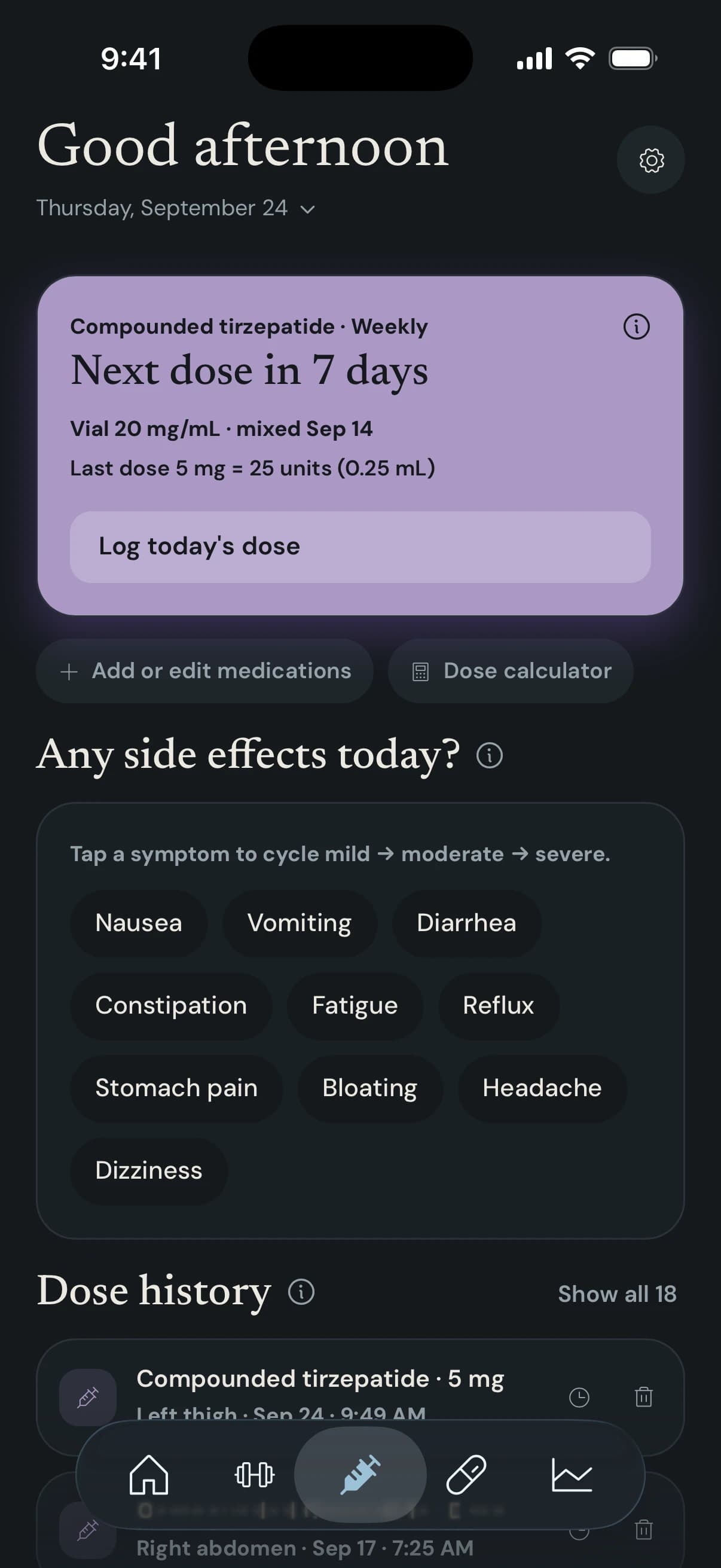
Each medication has its own plan and its own next-dose countdown, from daily and twice a day to monthly. Log a dose in a few taps, with the amount and where you injected, and log side effects in the same place.
Suggests the injection site you've used least recently
Reminders follow up if a dose is still due, then stop once you've logged it
Correct a time or delete a dose after a confirmation, and the countdown catches up
A calculator that shows its working
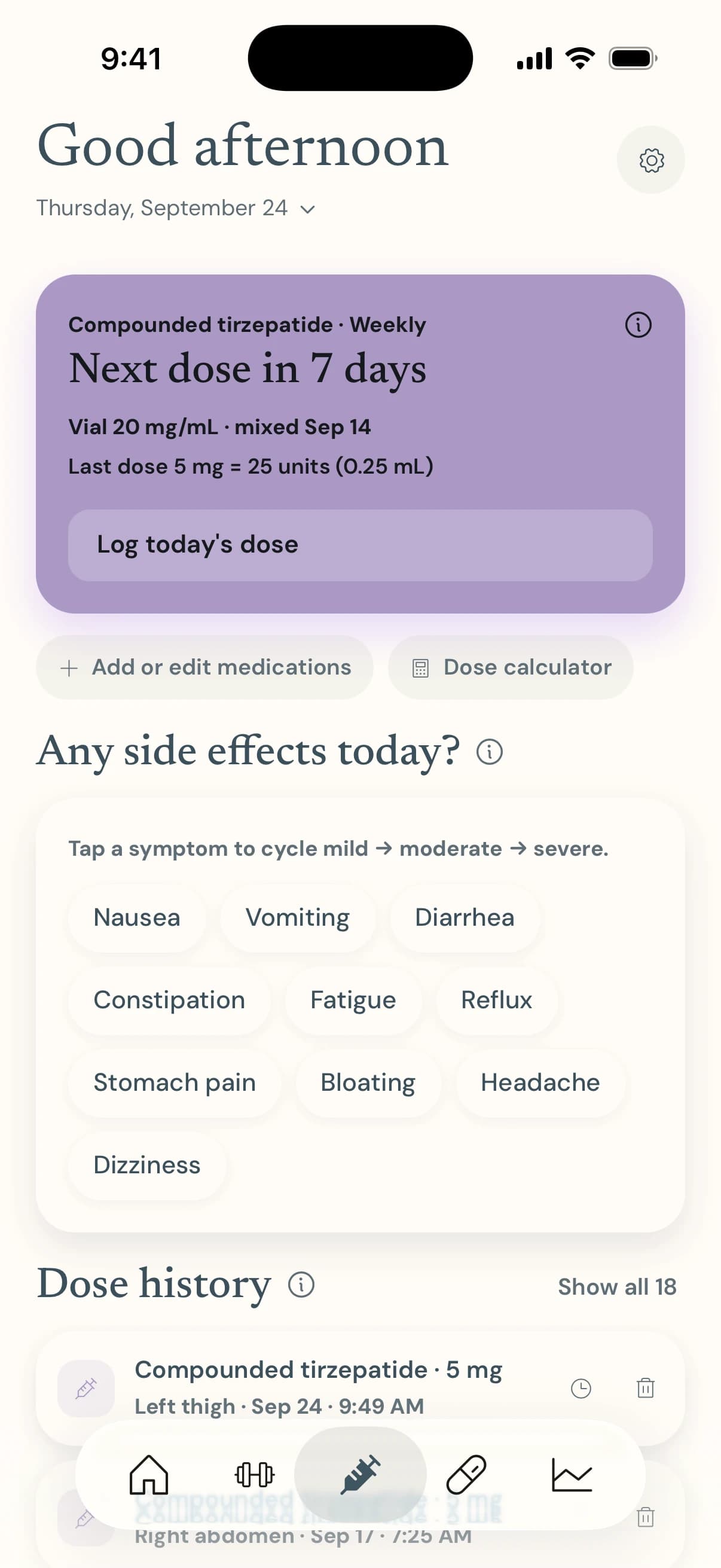
Compounded vials come with different strengths and it's easy to mix up mg, mL and syringe units. Anchor-1 puts all three on one line, repeats your vial and syringe back to you, and holds back a number that can't be right.
Ready-mixed liquid, or powder you've added water to
Warns above the highest labeled dose and on very small draws
Never tells you how much water to add — check every number with your pharmacist or prescriber
See what your numbers say
Weight against your goal, with the days you took a dose marked on the chart. Then the dose-by-dose view: what happened to your weight, side effects and mood at each dose you stayed on.
Only days you logged something count — a gap is never read as a good or a bad day
Insights say “a pattern in your own data, not proof of a cause”, and wait for enough doses first
Week, month and year views for every chart
From first launch to a daily habit
- 1
Tell it about you
Two short screens: your weight, your medication and how often you take it, then your daily targets. Every number can be changed later in Settings.
- 2
Log in a tap
A button for each dose, quick add for meals and water, one tap to say how you feel. Fix a time or delete an entry whenever you need to.
- 3
Let reminders do the remembering
Doses, supplements and a daily nudge arrive on your phone, follow up if something's still due, and go quiet once you've logged it.
- 4
See your own patterns
Trends turns your logs into progress toward your goal and dose-by-dose comparisons — and a plain-text summary for your care team.
A look inside the app
Real screens from the app, in the light and dark looks it ships with.
Today, at a glance
Every dose, on schedule
mg, mL and units together
A checklist, not a lecture
A rolling week of movement
Progress toward your goal
Every step up, charted
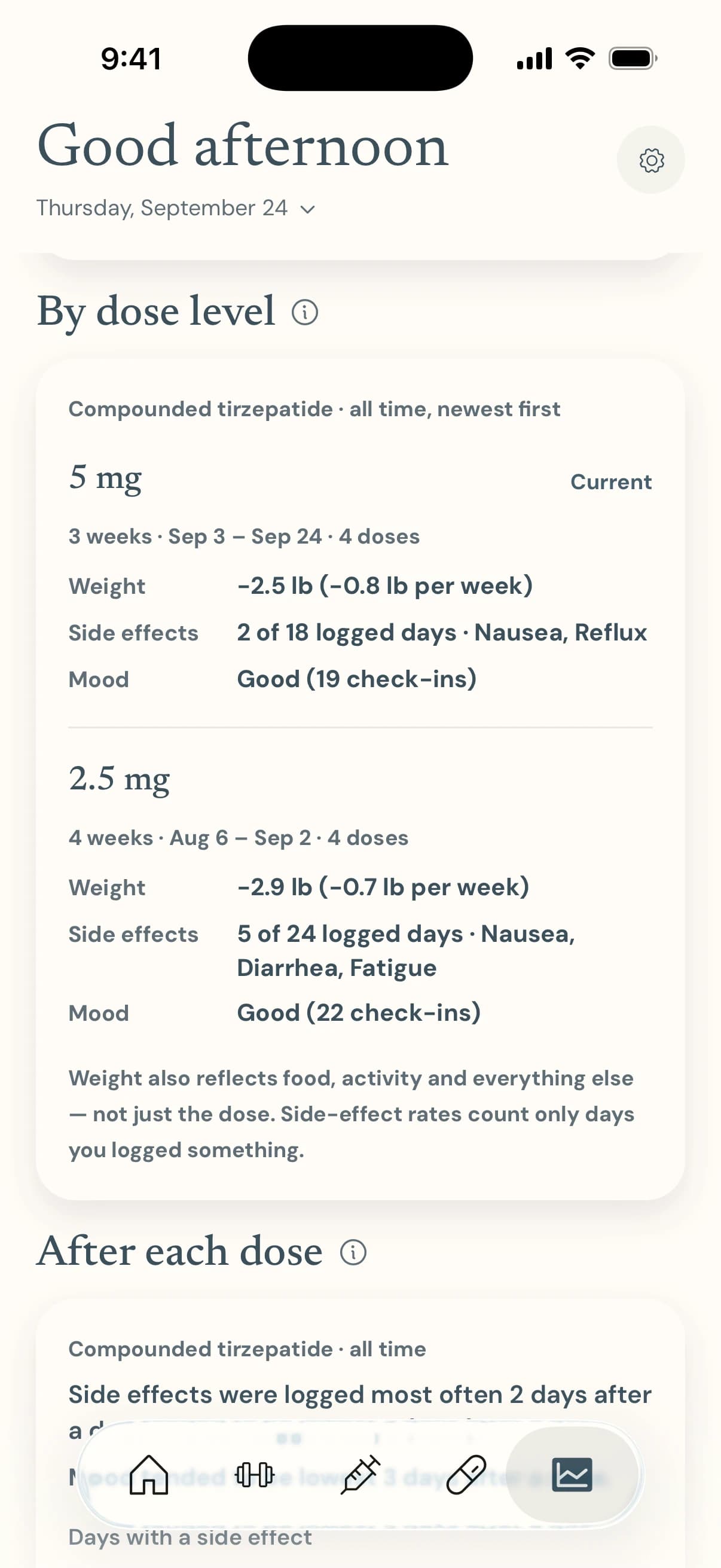
Each dose level, compared
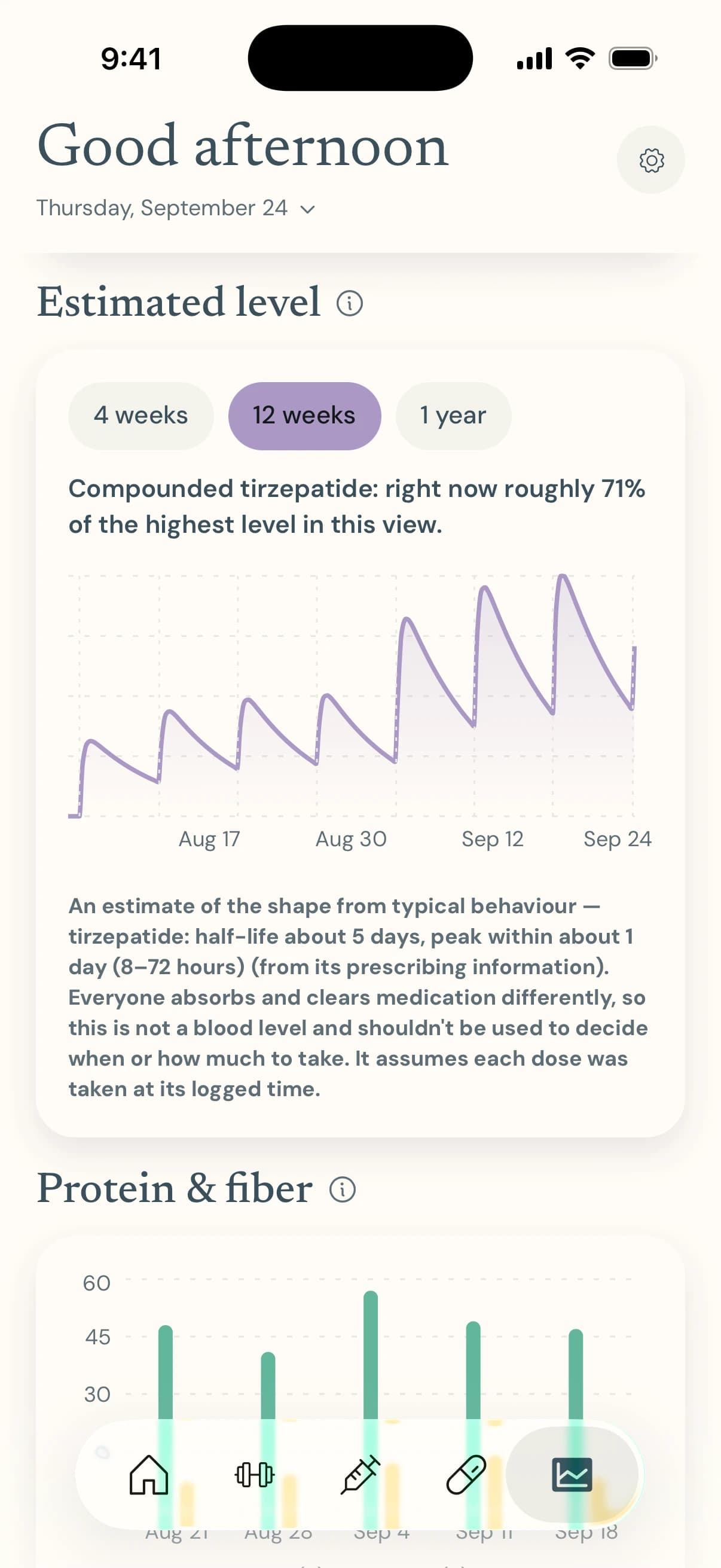
An estimated level, clearly labeled
Your health data stays yours
A plain-language summary. It doesn't replace the full policy — it's there so you don't have to take our word for it.
Everything you log — food, doses, weights, symptoms, supplements, settings — lives only on your phone.
No account, no sign-in, no email address. There is nothing to create and nothing to close.
Nothing is uploaded. Anchor-1 has no server that stores your health data, so there is no copy for anyone to lose or sell.
No ads, no analytics, no trackers inside the app.
To move to a new phone you export a backup file that you control, and import it there. Sharing with your care team is a summary you copy yourself.
Erase it all whenever you like: Settings → Reset all data, after a confirmation.
Common questions
What is Anchor-1?
Anchor-1 is a tracker for people on a GLP-1 medication. It keeps your doses, food, water, workouts, side effects, mood and supplements in one place, and shows your trends. It tracks what you do; it doesn't tell you what to do.
Which medications does it work with?
Semaglutide (Ozempic, Wegovy), tirzepatide (Mounjaro, Zepbound), dulaglutide (Trulicity), liraglutide (Saxenda, Victoza), exenatide (Byetta, Bydureon BCise), compounded semaglutide and tirzepatide, the oral semaglutide pill, a generic oral GLP-1, or any other medication by name. Each has its own schedule and its own next-dose countdown, and you can take more than one.
Is Anchor-1 free?
Yes, and it's ad-free. There is no purchase, subscription or paywall anywhere in the app, and no ads of any kind — so nothing to unlock and nothing competing for your attention.
Do I need an account?
No. There is no sign-up, no sign-in and no email address to give. Open the app, answer two short screens about you, and start logging.
Where is my data stored?
Only on your phone. Anchor-1 doesn't send what you log to a server, so there is no copy in the cloud for us to keep or lose. That also means it isn't backed up for you — export a backup file now and then (Settings → Backup) so a lost or replaced phone doesn't take your history with it.
Does it work offline?
Yes. Everything you log and see is on your phone, so Anchor-1 doesn't need a connection to work.
How do I move to a new phone?
On the old phone, export a backup (Settings → Backup → Export my data) and save the file to Files, iCloud Drive, or send it by AirDrop or Mail. On the new phone, choose “Restore from a backup” on the welcome screen. It replaces what's on the phone after showing you what the file holds, and you can undo it straight away.
Does it support twice-a-day medications?
Yes. Pick Twice a day for a medication such as exenatide (Byetta) and the card counts “1 of 2 doses today”, with a reminder for each dose. Weekly, every two weeks, monthly and every-N-days schedules work too.
I take a pill, not an injection. Does it work for me?
Yes. Oral medications such as the semaglutide pill don't ask for an injection site, and reminders and the countdown work the same way.
What does the dose calculator do?
For a compounded vial, you enter what the label says and the dose you want, choose your syringe, and it shows the dose in mg, the volume in mL and the mark to draw to in units — together, so a mix-up is easy to catch. If the draw wouldn't fit the syringe or the vial it shows a warning instead of a number. It never tells you how much water to add or what dose to take; check every number with your pharmacist or prescriber first.
What is the “Estimated level” chart?
A rough picture of how much of a weekly medication is in your body between doses, worked out from its typical half-life and the doses you logged. 100% is the highest point in the view. It isn't a blood test and shouldn't be used to decide when or how much to take. It is only available for semaglutide, tirzepatide and dulaglutide.
Can I share my data with my care team?
Yes. “Share with your provider” builds a plain-text summary of your medications, recent doses, weigh-ins, side effects, check-ins and average intake. You copy it into a message or patient portal yourself; nothing is sent anywhere until you do.
Do I have to track blood sugar?
No. Blood sugar and A1C tracking is optional and off until you turn it on in Settings or answer yes during setup. Turning it off hides the cards and keeps your readings.
How do reminders work?
Your phone delivers them; nothing is sent from a server. You can have a daily reminder to log, a reminder for each medication on the day it's due (and up to three follow-ups if it still isn't logged), and one reminder per time of day for supplements you haven't ticked off. Your phone asks for permission the first time one is scheduled.
How do I delete my data?
In the app: Settings → Reset all data, behind a confirmation. That removes everything Anchor-1 has saved on the phone. Deleting the app does too. Backup files you exported are yours to delete wherever you saved them. See /delete-data for the details.
Does Anchor-1 give medical advice?
No. Anchor-1 is a personal record and a set of calculators. It isn't a medical device and doesn't diagnose, treat or recommend anything. Decisions about your medication, dose and health belong with your prescriber or pharmacist.
Which phones and languages does it support?
Anchor-1 is built with Capacitor for iPhone and Android from one codebase; see the download section for the current store links. The app is in English for now.
How do I get help or report a problem?
Email support@r5iot.com (subject: “Anchor-1 Support”). Tell us what happened and, if you can, your phone model and the app version.

Ready when you are.
A private companion for GLP-1 treatment. Free and ad-free, no account, and everything stays on your phone.
Anchor-1 is a tracker, not medical advice. Talk to your prescriber or pharmacist about your treatment.